Friday, 4 November 2011

The Kids Are Online

The Kids Are Online: How to Keep Them Safe

woman and girl with computerOn Monday my nine-year-old daughter asked if she could borrow my iPad to do her music homework. She explained that her assignment was to listen to at least five minutes of classical music and her teacher had suggested the kids find something on YouTube.

YouTube? The idea of her browsing around YouTube on her own was out of the question. So we found something together—Wolfgang Amadeus Mozart’s Eine kleine Nachtmusik.

These days every parent has to teach his or her child how to navigate our very connected world. According to a recent survey by Intel, kids on average start using desktop computers at age 5½ and a laptop at 7½. So when do parents need to have the tech equivalent of the birds and the bees talk with their children? I consulted child psychologist Dr. Scott A. Roth to find out.

Dr. Roth suggests having the first conversation in kindergarten. Many kids are exposed to computers in schools at that age and they’re fully capable of browsing to their favorite sites. One of the biggest concerns should be if and how the site offers your child the ability to interact with others. The key at this age, says Dr. Roth, is to be in control of what your child can encounter.

NetNanny Mac 
NetNanny for Mac

So how do you set up safeguards for your kids? You can begin by creating a separate account on your computer for your child and setting up the parental controls that are built into the Windows and Max OS X operating systems. They cover which programs can be used, the time of day the computer can be used and the content or age ratings for games. If you let your child access the Internet, you’ll want to add a program that can filter web content and generate activity reports, like Bsecure Online ($49.95 at bsecure.com), NetNanny ($39.99 at netnanny.com) or Norton Online Family Premier($29.99 per year at norton.com).
According to Dr. Roth, the next phase starts around 8 or 9 years old, when kids are more socially in tune with what other kids are doing. He says that it’s important to talk about what’s appropriate in a text message or online, and to communicate the risks; once words are out there, it’s hard to take them back. Dr. Roth counsels his patients that if they can’t look someone in the eyes and say it, not to say it. Not bad advice at any age.

Then as kids begin puberty and start developing relationships with the opposite sex, you need to set new ground rules. The technology available today takes away the natural anxiety of approaching someone you’re interested in asking out. Plus kids don’t necessarily understand the potential risks of their actions. A middle-school-age girl may not grasp that the inappropriate picture she sent of herself to her boyfriend would be forwarded to his friends and friends of his friends.

It’s important to not only set limits and enforce them, but explain your reasoning. At this point, parents should consider reading their kid’s email and social networking pages. It does intrude on the child’s privacy, but digital messages are out there—somewhat in the public domain. If you can read them, so can a lot of other people.

Monitoring your child’s communications can also clue you in to cyberbullying. Cyberbullying is most common in middle school, but can happen earlier. Dr. Roth explains that the fear and isolation is the same as with regular bullying, but in cases of cyberbullying it follows the child home, which can cause them to feel there’s no safe haven.

Finally around 16 or 17, you need to let go. Let them know you trust them to be appropriate without your supervision. Your conversations don’t have to stop, but reading their Facebook page and other monitoring should.

Essential travel items for your laptop bag

When I pack my laptop bag for a day of meetings around town or a trip across the country, there are essential items I know from experience to keep on hand. These tools will keep your gear charged, get you connected to the Internet and let you work effectively, even in sub-optimal conditions.

Kensington

Kensington AbsolutePower all-in-one charger
Reduce your travel weight with one power brick that can serve the needs of your laptop, phone and tablet — or any other device that charges via USB. The 100 watts of power provide enough juice for all your devices simultaneously, and the charger’s 2.1-Amp USB ports ensure even high-drain devices like the iPad will charge properly.

Revolve Electronics

Revolve Electronics xeMini Plus cell phone charger
If you’re worried about becoming stranded without a phone, Revolve Electronics xeMini Plus provides approximately 6.5 hours of additional talk time from its 2200mAh battery. Most chargers are rated at 1150mAh (about three additional hours) or 1800mAh (about four additional hours). In addition to charging via USB, the xeMini Plus has a built-in solar panel to help keep it charged. Price: $73 on Amazon.com

Microsoft Arc Touch Mouse
Microsoft

I’m always forgetting to turn off my cordless mouse when I throw it in my laptop bag, but I never forget with the Microsoft Arc Touch Mouse. The simple act of bending it flat turns it off, and bending it back into a curve turns it on.
 
Klipsch
 
 
Klipsch Image S4i earphones
Very good sound at an affordable price make the Klipsch Image S4i headphones stand out. And because of their in-ear design, they naturally filter out ambient noise while traveling. The earphones come with a carrying case and three different-sized tips to ensure a proper fit.

T-Mobile 4G Mobile Wi-Fi Hotspot
T-Mobile

Create your own mobile Wi-Fi hotspot for up to five devices when you’re on the go. This model from T-Mobile runs on their speedy HSPA+ 4G network and is available without a contract for $129.99 on t-mobile.com. You can then buy Prepaid Mobile Broadband Passes. $10 buys 100 MB of data usage to be used over seven days; $30 provides 30 days access and 1 GB of data.

Tripp Lite Retractable Ethernet cable

Many hotels still don't offer wireless Internet, and some charge a rental fee for providing the Ethernet cable. So you’ll want your own Ethernet cable stashed in your bag just in case. This four-foot cable has the advantage of retracting into a small case to keep it tangle free.

TRAVEL ITEMS

Image: Arc Touch mouseWhen I pack my laptop bag for a day of meetings around town or a trip across the country, there are essential items to keep on hand. These tools will keep your gear charged, get you connected to the Internet and let you work effectively, even in sub-optimal conditions.

First "White Space" Network Launched

The wireless network will deliver high-speed internet to rural Virginia.

Wireless technology that's been touted as the best hope for providing high-speed Internet access to rural communities is about to get its first true test. The first "white space" wireless network will use unused portions of TV spectrum to distribute broadband access to residents of Claudville, VA.

Advocates for rural broadband say that high-speed Internet access is needed to improve healthcare and education in isolated communities. Others simply don't want their communities left behind while urban areas access ever more services over the Internet.

But bringing broadband to rural areas is easier said than done. Roger Hayden, director of the Claudville Computer Center and chairman of the Patrick County Broadband Task Force, said at a press conference Wednesday that in 2004, he called every carrier he could find, and none was willing to deliver a high-speed wired Internet service to Claudville. In the years since, local officials have been looking for another way to get better access.

Three months ago, they began planning for the construction of a "white space" network, which takes advantage of empty fragments of the TV spectrum scattered between used frequencies. This is a cheaper way to provide wireless broadband access in areas without a lot of existing infrastructure. But the FCC requires that such a network include technology that prevents it from interfering with existing broadcasts.

TV stations have traditionally broadcast over wireless frequencies that carry information longer distances.

For example, the spectrum between 512 megahertz and 698 megahertz, originally allotted to analog TV channels 21 to 51, offers longer range than conventional Wi-Fi, which operates at 2.4 gigahertz. With the ongoing transition from analog to digital broadcasts, more unused TV frequencies are opening up than ever.
Until late last year, it was illegal to operate over these unused frequencies. But in November 2008, new FCC regulations opened those portions of spectrum, with the provision that deployments follow strict requirements not to interfere with existing uses.

Hayden and others got in touch with Spectrum Bridge, a company based in Lake Mary, FL, that has been developing technology for white-space networks. To build the network, fiber-optic cable had to be laid to reach one location in Claudville. Beyond that, the wireless signal over white-space frequencies travels about 1.5 miles away from the router, says Spectrum Bridge CTO Peter Stanforth. That signal strength means that the network can cover the same area with one-tenth to one-fifteenth of the nodes of traditional Wi-Fi.

Another long-range wireless technology, WiMax, operates on licensed spectrum, making it more expensive to implement.

To avoid conflict with existing usage of the spectrum, Spectrum Bridge maintains a database that tracks which chunks of spectrum are being unused in which areas. Devices on Claudville's network will contact the company's database, reporting their location, and will be told what frequency to use to connect. Customers access the network as they would any Wi-Fi hotspot.

Thursday, 3 November 2011

Portable Hard Drives and NAT’s

These nifty additions to your network and computer can harbor unwanted guests which makes it imperative
 to have anti-virus software. Anti-virus software prevents hacking software from hiding in these normally sublime hardware that can be portable thus mobile taking it’s payload with it where ever you attach them.
Most software scans and monitors these gadgets for any infections but even when installing new storage devices such as hard drives and NAT’s it would be best to scan them from the start. It also allows the anti-virus software to recognize any built-in software that may come with the drives to monitor them effectively. Frequent updates to the anti-virus’s database and engine may also be necessary as well as updates to software that allows these attached hardware to function to keep you safe online each and every time you connect to the internet.

Firewalls Inadequate

With most anti-virus developers coming out with suite’s that feature several malware detection and prevention technologies all in one packages, the relevance of firewall software is undermined mainly due to the complexity of attacks that are on the internet. They used to work fine but in today’s brute force attacks, they are quite useless for malware now tries one tactic and then shifts to another if it is blocked at one front.

Malware has evolved as much as the technology that it attacks and a mere blocking of attacks on one front is futile. Many computers are even infected without the user knowing it leaving them with propagation points for other attacks.

Wednesday, 2 November 2011

Network Questions

Many issues impact network performance besides the hardware topology. To identify them, you have to ask the right questions.

Q Full duplex vs. half duplex vs. simplex—Can the nodes talk and listen simultaneously?

Devices that can talk and listen at the same time (e.g., telephones) are full-duplex devices. Citizen Band (CB) and other radio formats are normally half duplex—meaning they can talk and listen, but not simultaneously.


In this case, some indication is usually required to let the other party know it’s okay to talk (e.g., by saying “over”). RS-232 is a half-duplex data bus, and Ethernet is a full-duplex connection. Many modern devices can simulate full-duplex performance by switching between transmit and receive fast enough (in milliseconds) that humans can’t perceive the delay. Most cell phones are implemented with this fast switching strategy. Simplex systems communicate in one direction only. Half-duplex systems operate like simplex systems and then reverse the roles of transmitter and receiver.

Q Analog vs. digital—In what form does the signal enter the hardware medium?

In analog systems, the modulation technique is continuously variable (e.g., voice). Digital systems use an A/D converter to digitize the signal and send a data packet that uses 1s and 0s to represent the analog value.


 Digital transmissions offer such advantages as reduced fading, reduced noise, and increased throughput. Analog systems potentially have better resolution, though, because no digitization error is involved. In the old analog telephone systems, the voice modulated the electrical resistance and thus the voltage across the carbon granules packed in the mouthpiece. Digital systems replaced the old analog phone circuits many years ago, except for the phone line from your phone to the first switching station. The 4–20 mA system is an analog channel, and RS-232 and Ethernet are digital.


Q Baseband vs. broadband—Should you use a carrier to increase the number of channels that can be put on the network medium?

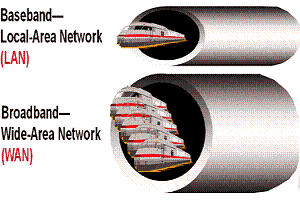
If the signal containing information is placed directly on the physical medium, the channel is called baseband. If the signal is placed on a carrier (modulation), the channel is broadband. Because many carriers can be placed on the same medium at different frequencies, a given hardware channel can carry many logical channels. Cable TV is a broadband network, with each TV channel on a different carrier frequency.


The TV channel designates the carrier frequency. Optical fibers now carry many more channels than once thought possible by modulating information onto the fiber at different frequencies of the light (colors).

Broadband systems are usually more complicated, so the tradeoff must be made with care. Standard Ethernet is a baseband bus, but wireless (radio) buses are usually broadband.


Q Master-slave vs. peer-to-peer vs. broadcast—How should the nodes interact with each other and with the host?

In master-slave protocols, one node gives the commands, and another node or collection of nodes executes them. The host is usually the master, and the sensors and actuators are usually slaves. This protocol allows tight traffic control because no node is allowed to speak unless requested by the master, and no communication is allowed between slaves except through the master.

In a peer-to-peer network, all nodes are created equal. A node can be a master one moment and then be reconfigured at another time. Peer-to-peer configurations offer the greatest flexibility, but they’re the most difficult to control. Any node can communicate directly with any other node.

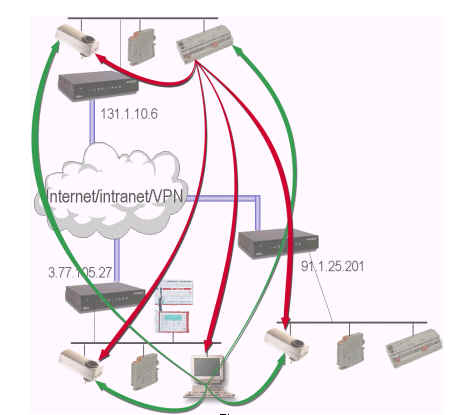
Broadcast networks are much like master-slave configurations, but the master can send commands to more than one slave at a time. Many industrial protocols (e.g., IEEE-1451) are based on master-slave (with broadcast) protocols. Wireless systems can be implemented in any of these protocols.


Q Circuit switched vs. packet switched—How long should a node own a communications channel?

Again, the old analog phone system is used as an example. These systems were circuit-switched networks. You dialed the number, and a circuit was established between the sender and the receiver. The circuit stayed connected as long as the phone call continued. When the parties hung up, the circuit was released and available for another connection.


Packet-switched networks route digital packets of information as they travel along different paths throughout the network. Each packet contains routing information so that the receiver can reassemble the packets into a complete message when they arrive. Complexity is high, but the potential for flexibility and improved channel use is also high. The Internet and World Wide Web are based on packet-switched networks.n