Wednesday, 2 November 2011

Network Questions

Many issues impact network performance besides the hardware topology. To identify them, you have to ask the right questions.

Q Full duplex vs. half duplex vs. simplex—Can the nodes talk and listen simultaneously?

Devices that can talk and listen at the same time (e.g., telephones) are full-duplex devices. Citizen Band (CB) and other radio formats are normally half duplex—meaning they can talk and listen, but not simultaneously.


In this case, some indication is usually required to let the other party know it’s okay to talk (e.g., by saying “over”). RS-232 is a half-duplex data bus, and Ethernet is a full-duplex connection. Many modern devices can simulate full-duplex performance by switching between transmit and receive fast enough (in milliseconds) that humans can’t perceive the delay. Most cell phones are implemented with this fast switching strategy. Simplex systems communicate in one direction only. Half-duplex systems operate like simplex systems and then reverse the roles of transmitter and receiver.

Q Analog vs. digital—In what form does the signal enter the hardware medium?

In analog systems, the modulation technique is continuously variable (e.g., voice). Digital systems use an A/D converter to digitize the signal and send a data packet that uses 1s and 0s to represent the analog value.


 Digital transmissions offer such advantages as reduced fading, reduced noise, and increased throughput. Analog systems potentially have better resolution, though, because no digitization error is involved. In the old analog telephone systems, the voice modulated the electrical resistance and thus the voltage across the carbon granules packed in the mouthpiece. Digital systems replaced the old analog phone circuits many years ago, except for the phone line from your phone to the first switching station. The 4–20 mA system is an analog channel, and RS-232 and Ethernet are digital.


Q Baseband vs. broadband—Should you use a carrier to increase the number of channels that can be put on the network medium?

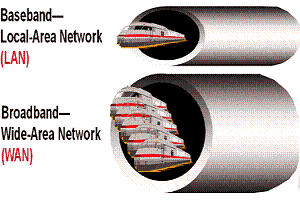
If the signal containing information is placed directly on the physical medium, the channel is called baseband. If the signal is placed on a carrier (modulation), the channel is broadband. Because many carriers can be placed on the same medium at different frequencies, a given hardware channel can carry many logical channels. Cable TV is a broadband network, with each TV channel on a different carrier frequency.


The TV channel designates the carrier frequency. Optical fibers now carry many more channels than once thought possible by modulating information onto the fiber at different frequencies of the light (colors).

Broadband systems are usually more complicated, so the tradeoff must be made with care. Standard Ethernet is a baseband bus, but wireless (radio) buses are usually broadband.


Q Master-slave vs. peer-to-peer vs. broadcast—How should the nodes interact with each other and with the host?

In master-slave protocols, one node gives the commands, and another node or collection of nodes executes them. The host is usually the master, and the sensors and actuators are usually slaves. This protocol allows tight traffic control because no node is allowed to speak unless requested by the master, and no communication is allowed between slaves except through the master.
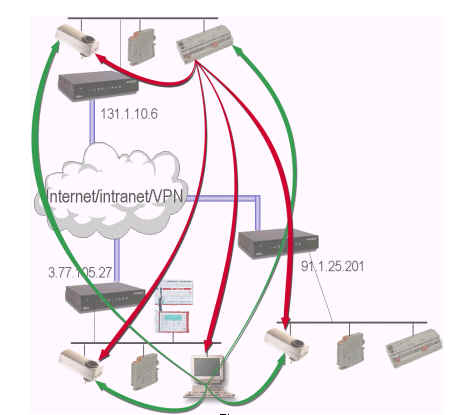
In a peer-to-peer network, all nodes are created equal. A node can be a master one moment and then be reconfigured at another time. Peer-to-peer configurations offer the greatest flexibility, but they’re the most difficult to control. Any node can communicate directly with any other node.

Broadcast networks are much like master-slave configurations, but the master can send commands to more than one slave at a time. Many industrial protocols (e.g., IEEE-1451) are based on master-slave (with broadcast) protocols. Wireless systems can be implemented in any of these protocols.


Q Circuit switched vs. packet switched—How long should a node own a communications channel?

Again, the old analog phone system is used as an example. These systems were circuit-switched networks. You dialed the number, and a circuit was established between the sender and the receiver. The circuit stayed connected as long as the phone call continued. When the parties hung up, the circuit was released and available for another connection.


Packet-switched networks route digital packets of information as they travel along different paths throughout the network. Each packet contains routing information so that the receiver can reassemble the packets into a complete message when they arrive. Complexity is high, but the potential for flexibility and improved channel use is also high. The Internet and World Wide Web are based on packet-switched networks.n

Monday, 31 October 2011

Skype is Now Part of Microsoft

Microsoft completed its previously announced acquisition of Skype -- a deal valued at $8.5 billion.

Microsoft states that its mission with the Skype business is "connecting all people across all devices." The current, free Skype service continues as before. Long term, Microsoft envisions tighter integration with its other platforms.

"Skype is a phenomenal product and brand that is loved by hundreds of millions of people around the world," said Microsoft CEO Steve Ballmer. "We look forward to working with the Skype team to create new ways for people to stay connected to family, friends, clients and colleagues — anytime, anywhere." Skype CEO Tony Bates will assume the title of president of the Skype Division of Microsoft immediately, reporting directly to Ballmer.

Skype also noted that on some days it carries 300,000,000 minutes of video calling traffic.

  • Skype was founded in 2002 by Niklas Zennstrom and Janus Friis and its initial release was in August of that same year. Skype was acquired by eBay in September 2005, and then acquired by an investment group led by Silver Lake in November 2009 for $2.75 billion.

Differences between IPTV and Internet TV

The Differences between IPTV and Internet TV

Internet Protocol Television or IPTV is a technology that allows television services to be delivered over a proprietary broadband packet data network using the internet protocol suite.
Internet TV on the other hand is a television broadcast service distributed over the internet.
IPTV is sometimes confused with the delivery of Internet TV.
Although both rely on the same core technologies, their approaches in delivering IP based video differ in the following ways:

Geographical Reach

IPTV is based on networks frequently owned and controlled by telecom operators, and as such reach only the subscriber base which has access to the operator network.
Internet television is available anywhere where broadband internet access is available.

Different Platforms

As the name suggests Internet TV leverages the public Internet to deliver video content to end users.

Quality of Service

Services running over the internet, such as Internet TV, are best effort services implying that there is no quality guarantee as to the final deliverable, the TV service.
This is because packets running over the internet may somehow be lost or corrupted making disassembly and interpretation impossible.
An IPTV service on the other hand is delivered over a networking infrastructure, which is typically owned by the service provider.
Owning the networking infrastructure allows telecom operators to engineer their systems to support the end-to-end delivery of high quality video.

Service Access

A digital set-top box is generally used to access and decode the video content delivered via an IPTV system whereas a PC is nearly always used to access Internet TV services.
Since the internet is more open than a propriety network, the dedicated home computer may also require digital rights management certification in order to ensure compliance with copyright laws.
In the IPTV service case copyright laws are handled during the contract negotiations between the operator and the media company providing the material (films, tv shows etc…).

User Charges

A significant percentage of video content delivered over the public Internet is available to consumers free of charge.
IPTV services on other hand are provided for a fee which could be a monthly subscription and which could include other bundled offerings.

Media Content

In the past, a good share of Internet TV video content was user generated. Today user generated content falls under the term of Web TV while Internet TV is similar to a classical broadcast service but through the internet.
IPTV on the other hand has always distributed traditional television shows and movies supplied principally by the established media companies.

Further Reading

For further information, the reader is referred to Torbjörn Cagenius, Andreas Fasbender, Johan Hjelm, Uwe Horn, Ignacio Más Ivars and Niclas Selberg Evolving the TV Exprience (Ericsson Review No.3, 2006) and Peter Arberg, Torbjorn Cagenius,Olle Tidblad, Mats Ullerstig and Phil Winterbottom Network Infrastructure for IPTV (Ericsson Review No.3, 2007).
Both sources were used as references for this article and both sources provide a sound overview as to the underlying technology and future evolution of IMS based IP Television.

Cisco, AT&T offer Wi-Fi IPTV

Cisco this week said it launched a wireless IPTV service with AT&T. Cisco says it is the sole provider of the wireless IPTV system, including receivers and access points, for AT&T's U-verse service.
The Cisco gear will be deployed across the entire U-verse footprint beginning Monday, October 31.

The system is intended to allow consumers to access high-definition video services throughout their homes wirelessly, enabling them to watch TV in any room in their home even if that room is not wired for TV.  Content is sent from the Cisco wireless access point via in-home Wi-Fi to the Cisco wireless receiver next to the TV.

The TV itself just has to be plugged into a power source and have a high-definition multimedia interface or other audio visual connection, and then the wireless connection can be established by clicking two buttons, Cisco says.

Cisco's wireless TV system delivers both standard definition and high definition programming to multiple receivers with integrated Wi-Fi. One access point per home can support two wireless receivers connected to TVs, Cisco says.

The receiver and access point - their brand names are the ISB7005 and VEN401, respectively -- are part of Cisco's Videoscape line of Internet TV products unveiled at the CES show in Las Vegas early this year. The Videoscape strategy was thought to be in danger this summer as Cisco essentially gutted its consumer business, followed by the departure of the head of its Service Provider Video Technology Group.
But then last week, Cisco acquired startup BNI Video, a maker of video delivery software for service providers, for $99 million. Cisco said BNI would help to advance its Videoscape strategy.

Getting back to the wireless IPTV products, Cisco's ISB7005 wireless receiver is designed to deliver live TV channels and interactive services, and also functions as an HD DVR. Consumers can view and manage DVR recordings wirelessly from a wired DVR in the home, Cisco says.

For the service provider, the Wi-Fi TV setup allows them to possibly differentiate their video offerings and ease home installation while accelerating service activation. The integrated Wi-Fi receiver also includes remote diagnostics so service providers can monitor the device's performance over the network, Cisco says.
The Wi-Fi IPTV products are based on the IEEE 802.11n standard, Cisco says, and include enhancements to manage delivery of video over Wi-Fi.

Hackers target business secrets

Intellectual property and business secrets are fast becoming a target for cyber thieves, a study suggests.

Compiled by security firm McAfee, the research found that some hackers are starting to specialise in data stolen from corporate networks.

McAfee said deals were being done for trade secrets, marketing plans, R&D reports and source code.
It urged companies to know who looks after their data as it moves into the cloud or third-party hosting centres.

"Cyber criminals are targeting this information based on what their clients are asking for," said Raj Samani, chief technology officer in Europe for McAfee.
He said some business data had always been scooped up when net thieves compromised PCs using viruses and trojans in a search for logins or credit card details.
The difference now was that there exists a ready market for the data they are finding. In some cases, said Mr Samani, thieves were running campaigns to get at particular companies or certain types of information.

The McAfee report mentioned cases in Germany, Brazil and Italy in which trade secrets were either stolen by an insider or cyber thieves tried to get hold of via a concerted attack.

In some cases, said the McAfee report, companies made the job of the criminals easier because they did little to censor useful information about a corporate's culture or structure revealed in e-mails and other messages.

Such information could prove key for thieves mounting a "social engineering" in which they pose as employees to penetrate networks.

The report detailed efforts by firms to watch casual and contract employees and the use of behavioural analysis software to spot anomalous activity on a corporate network.

Perimeter defences
Thefts of intellectual property or key documents could be hard to detect, said Mr Samani.
"You may not even know it's stolen because they just take a copy of it," he said.
Defending against these threats was getting harder, he said, because key workers with access to the most valuable information were out and about using mobile devices far from the defences surrounding a corporate HQ.
"Smartphones and laptops have crossed the perimeter," said Mr Samani.
The report comes in the wake of a series of incidents which reveal how cyber criminals are branching out from their traditional territory of spam and viruses.
2010 saw the arrival of the Stuxnet virus which targeted industrial plant equipment and 2011 has been marked by targeted attacks on petrochemical firms, the London Stock Exchange, the European Commission and many others.
Mr Samani said that, as firms start to use cloud-based services to make data easier to get at, they had to work hard to ensure they know who can see that key corporate information.
Otherwise, he warned, in the event of a breach, companies could find themselves losing the trust of customers or attracting the attention of regulators.
"You can transfer the work but you cannot transfer the liability," said Mr Samani.

For the good of the company? Five Apple products Steve Jobs killed


For the good of the company? Five Apple products Steve Jobs killed
When Steven P. Jobs returned to Apple 1997, he returned to a slew of ill-conceived product lines. Some were excessive, and some were downright silly, but many were ultimately killed off for their poor alignment with consumer needs and wants. Still, even with Jobs’ discerning eye, he wasn’t immune to having to deal with a few bad product decisions. Here are four products Jobs rightfully discontinued, and one misstep of his own.

The Pippin

Apple developed Pippin as a multimedia platform based on PowerPC Macs, running a pared-down version of the Mac OS. Though it looked like a gaming console, complete with boomerang-style controllers, the system was intended for more "general purpose" media use. Titles for the Pippin ran off of CD-ROMs, each of which included the operating system, since the Pippin platform had no onboard storage to speak of.
The only company that licensed the platform was Bandai in 1994, resulting in the Bandai Pippin @World player, available in white or black. But there was no room for a fourth console in a market dominated by the Nintendo 64, Sony Playstation, and Sega Saturn, systems that were both more powerful and already well integrated into the market. The only Pippin was discontinued in 1997, and fewer than 12,000 of the $599 systems were sold in the US between 1996 and 1998.

The Newton

The Newton predated Jobs’s return to Apple by some years, with the first MessagePad released in 1993. The PDA was developed under then-CEO John Sculley, who insisted in a keynote speech at the 1992 Consumer Electronics Show in Las Vegas that such devices would one day be commonplace.
The Newton platform was initially conceived as a range of tablets, including a 9” x 12” model priced at $5,000, but eventually leadership feared competition with Macs and launched only the smallest version, a 4.5” x 7” handheld model.
The first Message Pad was derided for its poor handwriting recognition and short AAA-fueled battery life, but the initial set of 5,000 units at MacWorld Boston in August 1993 sold out within hours at $800 apiece. The Newton was never exactly a failure, nor was it a runaway success over its five years on the market. When Jobs returned as CEO, he killed the Newton project rather than try to keep propping up a legacy that wasn't his own, planning to make a splash with his own line of mobile devices later on.

Twentieth Anniversary Mac

A favorite adjective of Apple critics is “overpriced,” one that Apple fully embraced with the release of a $9,995 desktop celebrating the company’s 20th anniversary in March 1997. From the limo delivery to the white-gloved home setup by a man in a tuxedo to the custom Bose sound system, the TAM was an exercise in excess. There was even a wrist rest on the keyboard, because carpal tunnel syndrome is for poor people.
But even with the wrist rest, there wasn’t enough excess to justify the price—the PowerMac 6500 introduced a month earlier had a nearly identical configuration for a fifth of the price. Around the same time Jobs ended the Newton program, he also ended the TAM’s run—the model was discontinued in March 1998, and the remaining computers were priced at $1,995 to get the stock moving.

Mac clones

In 1994, Apple decided the best way to expand its seven percent market share would be to start licensing its operating system to other manufacturers. Contracts were drawn up with licensing fees and royalties for each “clone” computer sold by OEMs such as DayStar, Motorola, Power Computing, and UMAX.
When the clones arrived on the market, Apple saw that the licensed OS wasn’t expanding the company's share at all—it was just eating into the company’s already modest hardware sales. The licensing agreements covered only Apple’s System 7, so when Jobs returned, he openly criticized the program and let the contracts expire, offering no new licenses for Mac OS 8.
Control of Macs returned to Apple, whose computer has since flourished thanks in part to the business' vertical integration. But the company had trouble stopping some manufacturers, such as Psystar, from making their own illicit Mac clones.

… And a Jobsian mistake: The Cube

The Power Mac G4 Cube, a computer suspended in a clear plastic box, was designed by Jonathan Ive and released in July 2000. The Cube sported a 450MHz G4 processor, 20GB hard drive, and 64MB of RAM for $1,799, but no PCI slots or conventional audio outputs or inputs, favoring instead a USB amplifier and a set of Harman Kardon speakers. The machine was known in certain circles as Jobs' baby.
While Apple hoped the computer would be a smash hit, few customers could see their way to buying the monitor-less Cube when the all-in-one iMac could be purchased for less, and a full-sized PowerMac G4 introduced a month later with the same specs could be had for $1,599. Apple attempted to re-price and re-spec the Cube in the following months, but Jobs ended up murdering one of his own darlings, suspending production of the model exactly one year after its release. While the Cube's design is still revered (it's part of the MoMA's collection), it proved consumers won't buy a product for its design alone.

Why new hard disks might not be much fun for XP users


The problem is hard disk sectors. A sector is the smallest unit of a hard disk that software can read or write. Even though a file might only be a single byte long, the operating system has to read or write at least 512 bytes to read or write that file.

512-byte sectors have been the norm for decades. The 512-byte size was itself inherited from floppy disks, making it an even older historical artifact. The age of this standard means that it's baked in to a lot of important software: PC BIOSes, operating systems, and the boot loaders that hand control from the BIOS to the operating system. All of this makes migration to a new standard difficult.

Given such entrenchment, the obvious question is, why change? We all know that the PC world isn't keen on migrating away from long-lived, entrenched standards—the continued use of IPv4 and the PC BIOS are two fine examples of 1970s and 1980s technology sticking around long past their prime, in spite of desirable replacements (IPv6 and EFI, respectively) being available. But every now and then, a change is forced on vendors in spite of their naturally conservative instincts.

Hard disks are unreliable

In this case, there are two reasons for the change. The first is that hard disks are not actually very reliable. We all like to think of hard disks as neatly storing the 1s and 0s that make up our data and then reading them back with perfect accuracy, but unfortunately the reality is nothing like as neat.
Instead of having a nice digital signal written in the magnetic surface—little groups of magnets pointing "all north" or "all south"—what we have have is groups pointing "mostly south" or "mostly north." Converting this imprecise analog data back into the crisp digital ones and zeroes that represents our data requires the analog signal to be processed.

That processing isn't enough to reliably restore the data, though. Fundamentally, it produces only educated guesses; it's probably right, but could be wrong. To counter this, the hard disks store a substantial amount of error-checking data alongside each sector. This data is invisible to software, but is checked by the drive's firmware. This error-checking data gives the drive a substantial ability to reconstruct data that is missing or damaged using clever math, but this comes with considerable storage overhead. In a 2004-vintage disk, for every 512 bytes of data, typically 40 bytes of error checking data are also required, along with a further 40 bytes used to locate and indicate the start of the sector, and provide space between sectors. This means that 80 bytes are used for data integrity for every 512 bytes of user data, so about 13% of the theoretical capacity of a hard disk is gone automatically, just to account for the inevitable errors that come up when reading and interpreting the analog signal stored on the disk. With this 40-byte overhead, the drive can correct something like 50 consecutive unreadable bits. Longer codes could recover from longer errors, but the trade-off is that this eats into storage capacity.

Higher areal density is a blessing and a curse

This has been the status quo for many years. What's changing to make that a problem now? Throughout that period, areal density—the amount of data stored in a given disk area—has been on the rise. Current disks have an areal density typically around 400 Gbit/square inch; five years ago, the number would be closer to 100. The problem with packing all these bits into ever decreasing areas is that it's making the analog signal on the disk get increasingly worse. The signals are weaker, there's more interference from adjacent data, and the disk is more sensitive to minor fluctuations in voltages and other suboptimal conditions when writing.
This weaker analog signal in turn places greater demands on the error checking data. More errors are happening more of the time, with the result that those 40 bytes are not going to be enough for much longer. Typical consumer grade hard drives have a target of one unreadable bit for every 1014 read from disk (1014 bits is about 12 TB, so if you have six 2 TB disks in an array, that array probably has an error on it); enterprise drives and some consumer disks claim one in every 1015 bits, which is substantially better. The increased areal densities mean that the probability of 400 consecutive errors is increasing, which means that if they want to hit that one in 1014 target, they're going to need better error-checking. An 80-byte error checking block per sector would double the number of errors that can be corrected, up to 800 bits, but would also mean that about 19% of the disk's capacity was taken up by overheads, with only 81% available for user data.

In the past, enlarging the error correction data was viable; the increasing areal densities offered more space than the extra correction data used, for a net growth in available space. A decade ago, only 24 bytes were needed per sector, with 40 bytes necessary in 2004, and probably more in more recent disks. As long as the increase in areal density is greater than the increase in error correcting overhead (to accommodate signal loss from the increase in areal density), hard drives can continue to get larger. But hard drive manufacturers are now getting close to the point where each increase in areal density requires such a large increase in error correcting data that the areal density improvement gets canceled out anyway!

Making 4096 bytes the new standard

Instead of storing 512-byte sectors, hard disks will start using 4096-byte sectors. 4096 is a good size for this kind of thing. For one, it matches the standard size of allocation units in the NTFS filesystem, which nowadays is probably the most widely used filesystem on personal computers. Secondly, it matches the standard size of memory pages on x86 systems. Memory allocations on x86 systems are generally done in multiples of 4096 bytes, and correspondingly, many disk operations (such as reading to or from the pagefile, or reading in executable programs), which interact intimately with the memory system, are equally done in multiples of 4096 bytes.

4096 byte sectors don't solve the analog problem—signals are getting weaker, and noise is getting stronger, and only reduced densities or some breakthrough in recording technology are going to change that—but it helps substantially with the error-correcting problem. Due to the way error correcting codes work, larger sectors require relatively less error correcting data to protect against the same size errors. A 4096 byte sector is equivalent to eight 512 byte sectors. With 40 bytes per sector for finding sector starts and 40 bytes for error correcting, protecting against 50 error bits, 4096 bytes requires (8 x 512 + 8 x 40 + 8 x 40) = 4736 bytes; 4096 of data, 640 of overhead. The total protection is against 400 error bits (50 bits per sector, eight sectors), though they have to be spread evenly among all the sectors.
With 4096 byte sectors, only one spacer start is needed, and to achieve a good level of protection, only 100 bytes of error checking data are required, for a total of (1 x 4096 + 1 x 40 + 1 x 100) = 4236 bytes; 4096 of data, 140 of overhead. 100 bytes per sector can correct up to 1000 consecutive error bits; for the forseeable future, this should be "good enough" to achieve the specified error rates. With an overhead of just 140 bytes per sector, about 96% of the disk's capacity to be used.

In one fell swoop, this change provides greater robustness against the problems caused by increasing areal density, and more efficient encoding of the data on disk. That's good news, except for that whole "legacy" thing. The 512 byte sector assumption is built in to a lot of software.

A 512-byte leaden albatross

As far back as 1998, IBM started indicating to the hard disk manufacturing community that sectors would have to be enlarged to allow for robust error correction. In 2000, IDEMA, the International Disk Drive Equipment and Materials Association, put together a task force to establish a large sector standard, the Long Data Block Committee. After initially considering, but ultimately rejecting, a 1024-byte interim format, in March 2006, they finalized their specification and committed to 4096 byte sectors. Phoenix produced preliminary BIOS support for the specification in 2005, and Microsoft, for its part, ensured that Windows Vista would support the new sector size. Windows Vista, Windows Server 2008, Windows 7, and Windows Server 2008 R2 all support the new sector size. MacOS X supports it, and Linux kernels since September 2009 also support it.

The big obvious name missing from this list is Windows XP (and its server counterpart, Windows Server 2003). Windows XP (along with old Linux kernels) has, somewhere within its code, a fixed assumption of 512 byte sectors. Try to use it with hard disks with 4096 byte sectors and failure will ensue. Cognizant of this problem, the hard disk vendors responded with, well, a long period of inaction. Little was done to publicize the issue, no effort was made to force the issue by releasing large sector disks; the industry just sat on its hands doing nothing.